Posted By
Posted On
June 3, 2025
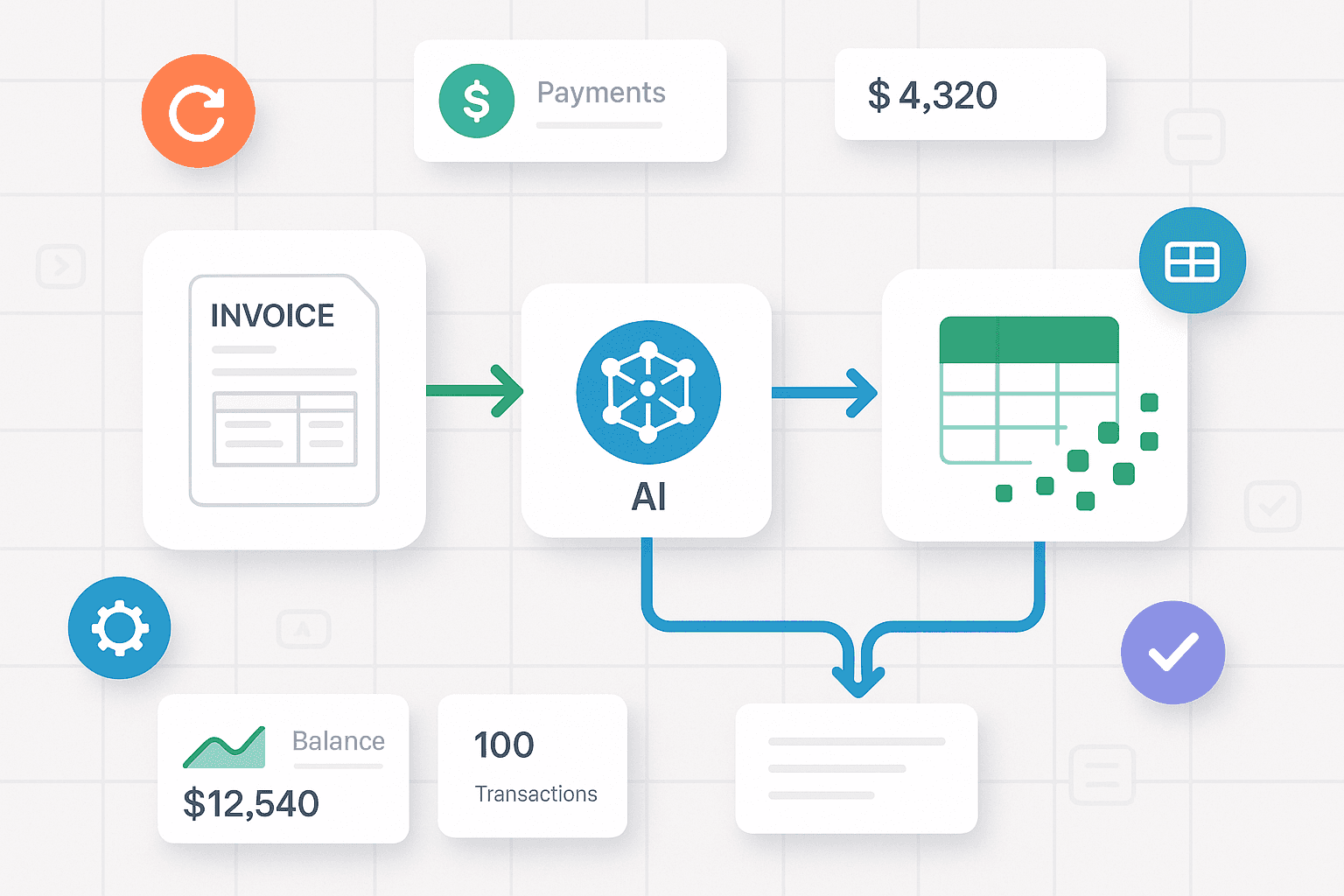
Manual invoice processing is one of the slowest, most error-prone parts of a business workflow. From scanning emails to inputting numbers into accounting software, the cycle is broken and expensive. But with visual AI tools and intelligent workflow platforms like n8n or Make.com, businesses can completely eliminate this bottleneck.
This article outlines how to build an invoice processing pipeline that works automatically—from reading invoices to pushing structured data into your finance system—with zero manual touch. Whether you're a freelancer, a growing company, or a large-scale agency, this solution delivers accuracy, scalability, and speed.
Why Manual Invoice Processing Is Obsolete
The traditional invoice processing method requires someone to:
Download invoice PDFs or images
Read and extract key values (vendor, amount, date)
Cross-check purchase orders
Enter data into accounting software
Save documents in proper folders
This takes time. A lot of it. Especially when multiple invoices arrive daily from different vendors in different formats.
What’s worse: errors are common. Typos in amounts, duplicate entries, or missed due dates often lead to financial friction.
The solution? AI-driven automation. With the right tools, you can automate this entire pipeline—capturing invoice data in seconds, with nearly perfect accuracy.
The AI Vision Advantage
AI Vision uses Optical Character Recognition (OCR) and intelligent field detection to extract information from PDFs, images, or scanned documents. Combined with workflow automation, it becomes a full engine for:
Scanning invoice attachments
Recognizing patterns in layouts
Extracting key data points
Validating entries
Organizing and storing records
Routing exceptions
Once set up, it requires no supervision—just a stream of invoices flowing into your system, and clean data coming out the other side.
n8n and Make.com: Your Automation Powerhouses
Both n8n and Make.com are powerful low-code platforms that let you build workflows using drag-and-drop tools. While Make.com is extremely beginner-friendly and visually polished, n8n is preferred for advanced control, self-hosting, and logic-based execution.
Here’s how they fit in:
n8n: Ideal for customized pipelines, self-hosted operations, and teams that want full control over logic, AI calls, and error handling.
Make.com: Better suited for teams wanting a faster start, with built-in templates and pre-integrated apps.
For invoice automation, both platforms offer the essential building blocks: file triggers, OCR integration, conditional checks, spreadsheet actions, and external app integrations (like email, CRMs, or accounting tools).
How It Works: Step-by-Step Invoice Automation Pipeline
Let’s break down a practical zero-touch pipeline using either n8n or Make.com.
Step 1: Detect Incoming Invoice
Set up a trigger to watch for new invoices:
Email inbox label
Cloud storage folder (Google Drive, Dropbox)
Upload portal or webhook
Each time a new file is detected, the workflow starts automatically.
Step 2: Extract Text with OCR
The invoice—PDF or image—is passed through an OCR node. This converts visuals into raw text.
OCR output usually includes the full body of the invoice—text lines, tables, and unstructured content.
Step 3: Parse and Clean Data
This is where AI or prompt-based extraction comes in. You instruct the system to find and extract key fields like:
Vendor name
Invoice number
Issue date
Due date
Line items and quantities
Total amount
In n8n, this can be done using JavaScript functions or language model nodes. In Make.com, you can use text parsing tools or external AI modules.
Step 4: Validate Key Fields
Apply conditional checks such as:
Are total values calculated correctly?
Is this invoice already processed (based on number/date)?
Does the vendor match an internal database or contact list?
Errors can trigger an alert or move the invoice to a review folder.
Step 5: Push to Spreadsheet or Accounting Tool
Once validated, structured data is sent to its destination:
Google Sheets or Airtable for records
Internal database or dashboard
Accounting system (via webhook/API)
All attachments and metadata (timestamp, status, reviewer notes) can also be logged.
Step 6: Route Exceptions
If an invoice fails a validation rule (e.g., missing fields, unreadable content), it is flagged. You can:
Send an alert via Slack or Email
Push it to a manual review sheet
Store it in a “Pending” folder for later handling
This keeps your pipeline flowing even when edge cases appear.
Benefits of This Workflow
Speed: Process 100+ invoices in the time it takes to manually do 2.
Accuracy: Consistent extraction eliminates typos and mismatches.
Scalability: Add more inputs (vendors, departments) without extra staff.
Cost Reduction: One-time setup can reduce AP processing costs by 70–90%.
Compliance: Timestamped, organized records improve audit readiness.
Whether you’re handling 50 or 5,000 invoices a month, this solution grows with you.
Real-World Example
Imagine this scenario:
You run a small agency. Your finance team receives 20+ invoices daily from freelancers and vendors. Instead of opening each one, copying values, and updating records, your n8n pipeline does the work.
It monitors your “Invoices” email label
Extracts PDFs, runs OCR, and finds the amount
Validates payment terms
Inserts structured data into a shared Google Sheet
Notifies you only if something’s off
No delays. No backlogs. Your team focuses on exceptions—not routine admin.
Why Agensync?
At Agensync, we specialize in building these zero-touch automation systems. Our custom invoice pipelines are tailored for:
Agencies
Ecommerce brands
Finance teams
Service providers
SaaS companies
We understand the nuances of different invoice formats, internal rules, and workflow preferences. Whether you're using n8n or Make.com, we build robust systems that don’t break under pressure.
What you get:
Strategy call + process mapping
Pipeline build-out & testing
Custom OCR + AI instructions
Integration with your sheets, CRMs, or accounting tools
Monitoring dashboards + exception tracking
We don’t just automate—we optimize.
Getting Started: What You Need
Here’s your quick checklist to build your pipeline:
A few sample invoices (PDF or images)
Decide where they’ll arrive (email, upload, cloud)
List of fields to extract (amount, date, etc.)
A spreadsheet or system to push data to
Rules for exceptions (what counts as a problem)
With this, Agensync or your internal team can deploy a working prototype in 2–4 days.
Scaling Over Time
Once your pipeline is live, you can:
Add vendor-specific rules
Train the model to handle new formats
Automate invoice approvals
Route payments automatically
Set up monthly summaries and reporting
The system becomes smarter, faster, and more valuable with time.
Final Thoughts
AI-driven invoice processing isn’t just a nice-to-have. It’s the future of accounts payable. With tools like n8n and Make.com, paired with clear business logic, you can eliminate repetitive work, reduce costs, and increase transparency across your financial workflows.
And if you want expert help—from design to deployment—Agensync is here to automate it all for you.
Stay Informed with AgenSync Blog
Explore Insights, Tips, and Inspiration
Dive into our blog, where we share valuable insights, tips, and inspirational stories on co-working, entrepreneurship, productivity, and more. Stay informed, get inspired, and enrich your journey with Wedoes.